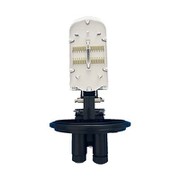
The Function And Connection Method Of Optical Fiber Terminal Box
May 10, 2023
The optical fiber terminal box is the terminal connector of an optical cable, one end is an optical cable, and the other end is a pigtail, which is equivalent to a device that splits an optical cable into a single optical fiber. The user optical cable terminal box installed on the wall, its function is to provide optical fiber and Splicing of optical fibers, fusion of optical fibers and pigtails, and handover of optical connectors. It also provides mechanical and environmental protection for the optical fiber and its components and allows for proper inspection to maintain the highest standards of fiber management.
Connection:
1. Connect the pigtail from the fiber optic terminal box to the WAN port of the router.
2. Connect the LAN port of the router to the switch.
3. Connect the computer network cable to the switch.
4. Just set the router's gateway 192.168.1.1 in TCPIP on a computer (usually this).
5. Log in to the router, (fill 192.168.1.1 in IE) username and password admin, add static IP, subnet mask, DNS.
6. Save and restart the router.